Putting my game playtime on my website
How a Windows PowerShell collector, an authenticated Vercel API, and Neon PostgreSQL keep my game playtime up to date without rebuilding the site.

On this page
I added playtime to the Games section on my website so I could see it alongside screenshots, ratings, and quotes about the games I play.
Steam and Modrinth already had the totals, so I built a PowerShell collector to read them from my Windows PC and upload them through an authenticated Vercel API to Neon PostgreSQL. The website fetches the totals without needing a commit or deployment for each update.
The code is in the website repository.
What actually runs#
I initially considered having a GitHub Action update a JSON file and trigger a Vercel deployment. A database avoids those repeated builds, while quotes and personal ratings can stay in the files I edit manually.
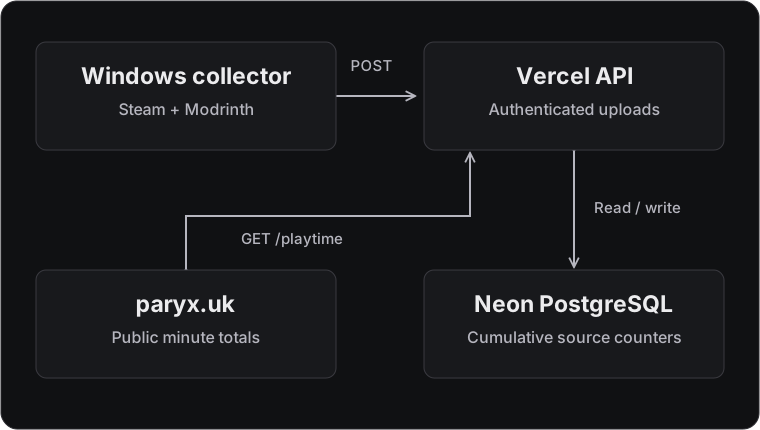
There are four pieces:
- A Windows PowerShell collector, intended to run hourly.
- A Vercel function at
api.paryx.uk/playtime. - Neon PostgreSQL, holding cumulative minute totals.
- The game showcase on
paryx.uk, which reads the public API.
The collector runs once per invocation, making it suitable for an hourly scheduled task.
Collecting existing playtime#
For Steam, the script finds the installation and active user's local data, parses the VDF files, and checks installed game manifests across the library folders. It reads the cached Playtime values in minutes.
Each game becomes a record:
[pscustomobject]@{
    GameId  = $appId
    Minutes = $minutes
}
GameId holds Steam's numeric app ID as a string, such as "1293830" for Forza Horizon 4. The backend maps it to the website's forza-horizon-4 ID.
Modrinth keeps its instance data in a local SQLite database. The collector uses sqlite3 to read the combined submitted and recent playtime:
SELECT COALESCE(
    SUM(
        CAST(submitted_time_played AS INTEGER) +
        CAST(recent_time_played AS INTEGER)
    ),
    0
)
FROM instances;
Those counters are in seconds, so they are converted to whole minutes before upload:
$minutes = [long][Math]::Floor($seconds / 60.0)

[pscustomobject]@{
    GameId  = 'minecraft'
    Minutes = $minutes
}
Minutes stay unchanged through storage and uploads; the website formats 125 as 2 hours 5 minutes for display.
The collector source contains the complete extraction functions and upload wrapper.
Mapping Steam IDs on the server#
The backend filters the collector's library against a mapping of games on the website:
export const steamAppIds: Record<number, string> = {
  526870: 'satisfactory',
  1293830: 'forza-horizon-4',
  1943950: 'escape-the-backrooms',
  2141730: 'backrooms-escape-together',
};
The full mapping is in the validation module.
An upload looks like this:
{
  "collectorId": "windows-main",
  "sequence": 42,
  "entries": [
    { "gameId": "1293830", "source": "steam", "minutes": 1221 },
    { "gameId": "minecraft", "source": "modrinth", "minutes": 15054 }
  ]
}
Unmapped games are skipped individually before storage, so they do not reject mapped entries in the same batch. Mapped entries require nonnegative whole minutes and a recognised source; duplicate source/game pairs and oversized uploads are rejected. Adding a catalogue game only requires changing the server mapping.
Public reads, private uploads#
POST /playtime requires a bearer token in the Authorization header, checked against a private Vercel environment variable before database access. Missing or incorrect tokens get a 401 response.
The token comparison uses fixed-length hashes:
export function authenticated(header: unknown, token: string): boolean {
  if (typeof header !== 'string' || !header.startsWith('Bearer ')) return false;
  const supplied = header.slice(7);
  if (!supplied || supplied.length > 1024) return false;

  return timingSafeEqual(
    createHash('sha256').update(supplied).digest(),
    createHash('sha256').update(token).digest(),
  );
}
createHash and timingSafeEqual come from Node's crypto module.
The collector stores a DPAPI-protected token locally, decrypts it under the Windows account running the task, and sends the underlying bearer token over HTTPS.
GET /playtime exposes game totals and an update timestamp to the website.
The API handler handles authentication, validation, public reads, and cache headers.
Making retries safe#
Cumulative totals make retries safe when an upload succeeds but its response never reaches the PC: sending the same total again cannot add those minutes twice.
The wrapper saves each pending batch locally before sending it and retries failed requests on the next run. It skips unchanged snapshots and uses a named mutex to prevent overlapping runs from sharing a state file.
Each new batch gets an increasing sequence number, which retries reuse. A fingerprint of the normalised entries distinguishes identical retries from different data submitted with the same sequence.
Neon holds two main tables: one for the collector's latest sequence and fingerprint, and another for cumulative totals keyed by collector, source, and game.
The sequence gate in the database is:
ON CONFLICT (collector_id) DO UPDATE
  SET last_sequence = EXCLUDED.last_sequence,
      payload_hash = EXCLUDED.payload_hash,
      updated_at = now()
  WHERE playtime.collectors.last_sequence < EXCLUDED.last_sequence
The accepted collector row feeds the total updates through a common table expression in the same SQL statement, making sequence acceptance and the batch writes atomic.
For each source/game total, the update uses:
ON CONFLICT (collector_id, source, game_id) DO UPDATE
  SET minutes = GREATEST(playtime.totals.minutes, EXCLUDED.minutes),
      updated_at = now()
GREATEST prevents counters from decreasing, while omitted entries retain their previous values. A source that resets its lifetime counter needs a corrected cumulative baseline in the extractor.
The Neon store implementation contains the full parameterised statement.
Reading totals without rebuilding the site#
The public response is small:
{
  "version": 1,
  "updatedAt": "2026-10-05T00:00:00.000Z",
  "games": {
    "minecraft": { "pc": 15054 },
    "forza-horizon-4": { "pc": 1221 }
  }
}
updatedAt records when the data was accepted.
The website loads local game data, then fetches API totals in the background and replaces recognised PC values:
details[id] = {
  ...details[id],
  playtime: {
    ...details[id]?.playtime,
    pc: minutes,
  },
};
The merge preserves manual mobile and console values and checks for nonnegative safe integers so zero remains valid.
Failed requests leave the file-based fallback intact; successful requests can update an open showcase. Opening a showcase after the one-minute local cache expires refreshes the totals.
A short CDN cache reduces database reads, with cached totals briefly trailing new uploads while the cache revalidates.
The frontend merge and fetch module handles that integration separately from display formatting.
Checking the complete flow#
Before applying the migration to production, I tested duplicate uploads, older sequences, simultaneous writes, source totals, and failed-batch rollback on an isolated Neon branch.
The collector tests mock extraction and HTTP requests to exercise offline retries, unchanged snapshots, and recovery when the local sequence is behind the server. Frontend tests check that remote PC values preserve manual console/mobile values and that failed requests keep the fallback.
A real collector run returned 23 entries, with 10 mapped game totals verified through the public API.
The current system supports one collector identity and PC uploads from Steam and Modrinth on Windows. Supporting another PC would need a source policy that avoids counting the same Steam lifetime total twice.
The complete repository includes the collector, API, migrations, frontend integration, and tests. You can see the result in the Games section, or inspect the public playtime response directly.